Main Article / Jul 30, 2026
The new search tools opening up the UAP files
The government released folders, scans and videos. A fast-growing group of independent archive builders is turning them into search pages, timelines, image galleries and routes through the record.
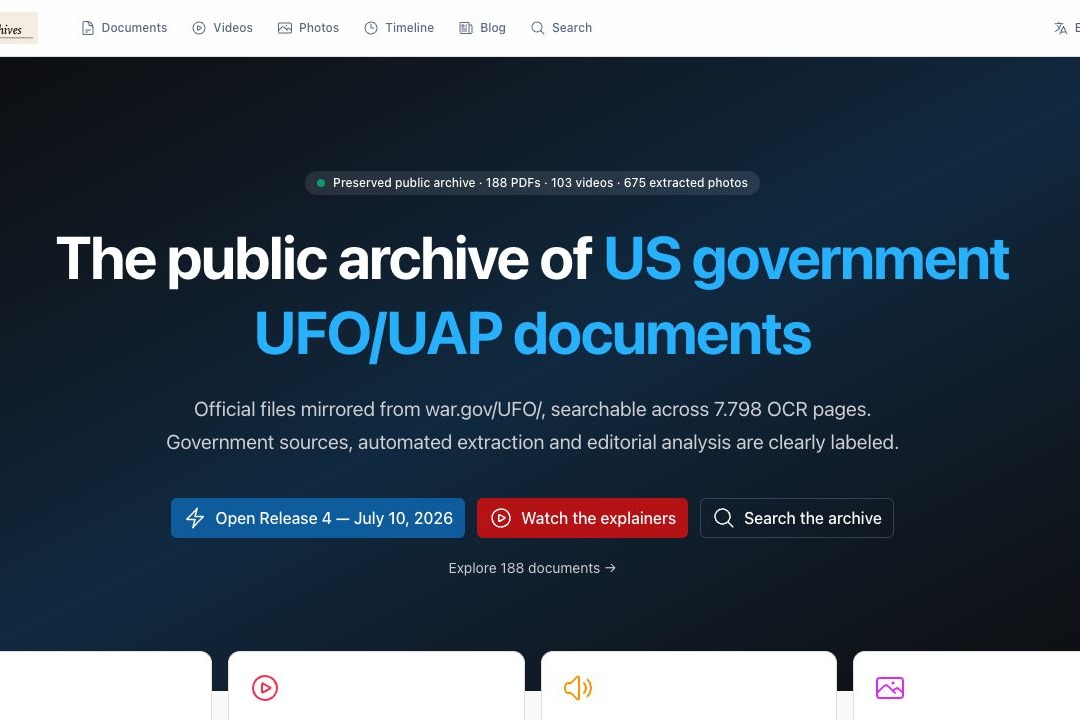
When the first PURSUE release appeared in May, the useful material came as government folders, scanned PDFs, video files and a formidable number of filenames. The files were public. Finding one particular witness statement, image page or older report inside them was another job. By July 10, a fourth release had followed and the collection had grown well beyond that first download list.
That gap has filled quickly. Independent builders have begun giving the release its own front doors: full-text search, image galleries, timelines, agency filters, case pages and maps. The result is a small but lively new research scene around the UAP files themselves.
They offer different ways into the same release. One is built around fast retrieval, another around a visual archive, another around a particular case, agency or decade. Together, they make the public material easier to meet as a record rather than a pile of downloads.
There is also an older reference point. John Greenewald Jr.'s The Black Vault has collected government records through FOIA for decades. Within days of the first PURSUE drop, it added a dedicated UAP-file search engine with processed PDFs, OCR text, video, images and related metadata. The newer sites belong to a fast-moving moment; The Black Vault shows the longer archival tradition behind it.
From folders to ways in
UAP Archives is one of the most expansive attempts. It says it mirrors the public releases, runs OCR across the scans, extracts images and lets readers search thousands of pages. A file page can open into the scanned material, image extracts and a machine-generated overview. The site labels those automated summaries as such and tells readers to check important claims against the original document.
UFO Declassified takes a more navigational approach. Its database is arranged by document, agency, topic, release and year. Someone arriving with “Apollo 12,” “Pantex” or an old FBI file number can start from a named route instead of hunting through a release bundle.
WARUFO puts a long filterable list at the centre. It is less interested in building a single narrative around the release than in making the file list legible: agency, title, description, date, location and a link back to the original PDF or video host.
Other projects are even more focused. UFO Files groups the first release into topics and searchable file cards, with direct source links. The community-built list is already longer than these four examples: there are datasets, Markdown transcriptions, image-extraction projects and experimental maps alongside the public-facing archives.
What a reader can do with them
The gain is practical. A page about the 1949 Los Alamos conference can sit beside the document itself. An agency filter can pull NASA material out from beside FBI correspondence. An image gallery can surface a page that would otherwise be buried in a multi-hundred-page scan. A date route can place a 1948 Project Sign record beside a modern sensor clip.
That changes the rhythm of research. The old method was to download a bundle, remember its naming conventions and hope an in-document search survived the scan. The newer sites make exploration quicker: follow a person, a place, an agency, a case number or an image. Sometimes the fastest discovery is simply noticing what sits beside the file you came for.
Several views of the same release
Each project makes choices about labels, categories, extracted images, search terms and which connections are worth presenting. That is part of the appeal. A document archive feels different when entered through a timeline than when entered through a case page or an agency list.
It also means the sites work best as routes into the record, not replacements for it. The useful habit is simple: when a page points to a document, open the document. When it offers an OCR passage or an automatic summary, treat it as a helpful way to find the relevant page. The original release remains one click away on the strongest of these tools.
This is not a weakness unique to UAP research. Every archive has cataloguing decisions, search limitations and different ways of describing the same historical item. What is new here is the speed. The UAP release was only weeks old when people began building new ways to read it.
The builder moment
Part of that speed comes from a change well beyond the UAP world. AI-assisted coding now lets a researcher with an idea for a database, a search page or a map get a working version on screen very quickly. The phrase “vibe coding” has become the shorthand for describing a project in ordinary language and letting an AI coding tool do much of the first construction.
That does not make every archive the same, or reduce its maker to a prompt. It does help explain why the release has attracted so many different interfaces in such a short time. A researcher can now try an idea — a case map, image browser, OCR search or timeline — before committing months to a conventional software project.
Mick West’s running Metabunk thread began as a list of these tools. Its most useful observation is simply that the old relationship between an archive and a software team has changed. A public release can now acquire many small, independent reading rooms almost immediately.
A growing public research layer
A public release becomes more useful when readers can find their way around it, compare it with related material and see the source for themselves. That is what this new layer of tools is starting to provide: many different paths into the same public record.
The approach is already visible in individual cases. The Release 04 guide follows a batch across historical documents and recent clips, while the Pantex image note stays with a single short file fragment. Search tools make both routes easier to find; the record still decides how far either one can go.
Where to start
- UAP Archives — OCR search, extracted images and document pages across the releases.
- UFO Declassified — browse by agency, topic, release, timeline or document database.
- WARUFO — filterable archive list with links to original public files.
- UFO Files — searchable release cards, topic routes and direct document links.
- The Black Vault’s UFO Files Search Engine — an established FOIA archive’s searchable route into the releases.
- Metabunk’s running list of UAP-file tools — a useful starting point for seeing how quickly this ecosystem has grown.
Sources
- Department of War, PURSUE UAP releases — original public release portal.
- UAP Archives — project description, document search and source labelling.
- UFO Declassified — document database, agency routes and release index.
- WARUFO archive — filterable document list and original-file links.
- UFO Files — release cards, topic paths and source-link approach.
- The Black Vault, “The Black Vault Launches Searchable UFO Files Release Archive”, May 11, 2026 — the project’s description of its processed release archive and search engine.
- Mick West, “Vibe-Coded UFO Apps,” Metabunk, July 5, 2026 — a running community list of emerging tools.